
By Dr. Mueed Akhtar, founder of HawkInc
Quick answer: Notary Business Tracker Spreadsheet is a notary and loan signing resource made for notaries public and loan signing agents who want correct, ready-to-use forms and tools for their business. Notary business tracker spreadsheet for mobile notaries and loan signing agents: log every job, income, expense and mile, print invoices and estimate your taxes. Works in Excel and Google Sheets.
Who it is for
This notary and loan signing resource is for notaries public and loan signing agents who want correct, ready-to-use forms and tools for their business.
What’s included
- Notary Business Tracker in 3 color themes: Navy & Gold, Blush & Rose, Black & Gold (.xlsx)
- A filled-in sample workbook so you can see how everything works
- START HERE PDF with setup steps
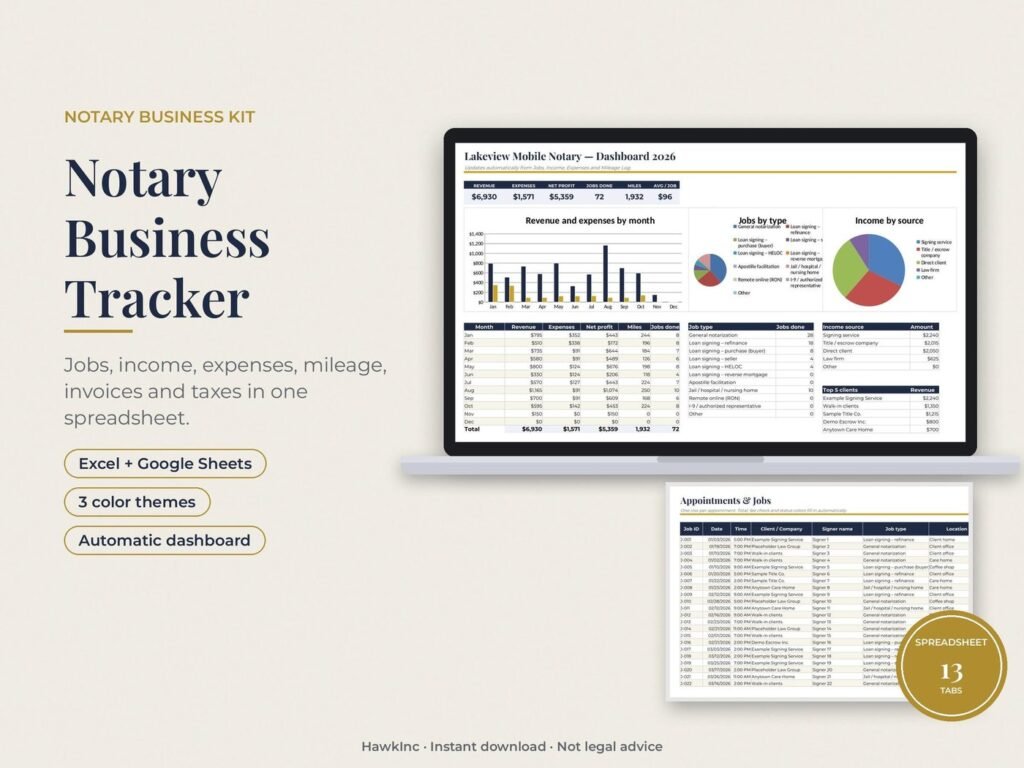
13 linked tabs
- Start Here: your business details, state and mileage rate
- Dashboard: revenue, expenses, net profit, miles and jobs by month, charts, top 5 clients
- Jobs: one row per appointment with notary, travel, print and scanback fees, status colors and a fee check against your state’s maximum
- Fee Calculator + State Fee Table: maximum notary fee for all 50 states + DC (editable)
- Income and Expenses: with categories, payment method and 1099 tracking
- Mileage Log: odometer or trip miles, deduction calculated (2026 IRS rates built in, including the July 1 mid-year change)
- Invoices + Print Invoice: give jobs an invoice number and print or save a clean invoice as PDF
- Clients: revenue and job count per client
- Taxes: self-employment tax, rough income tax and quarterly estimated payments with due dates
- Commission & Compliance: renewal dates for commission, bond, E&O and background check (turns red at 90 days)
How it works
- Download the zip from your Etsy purchases page and unzip it.
- Excel: open your theme. Google Sheets: Drive > New > File upload, open the file, then File > Save as Google Sheets.
- Fill in the white cells. Colored cells are formulas and calculate for you.
Good to know
- This is a business tracker, not an official notary journal. Keep your state’s required journal separately (see our Notary Journal listing).
- Tax figures are rough planning estimates, not tax advice.
- Works in Microsoft Excel 2016 or newer and Google Sheets. Not tested in Apple Numbers.
Please note
- This is a DIGITAL DOWNLOAD. No physical item will be shipped.
- General reference and business tools. Not legal advice. The signer or the document’s preparer chooses the notarial act; always follow your state’s notary law and handbook.
- Wording and rules were checked against official sources in November 2026. If your state changes a rule, message us for a free updated file.
- For the buyer’s own business use. Please do not share or resell the files.
How to use it, step by step
- Download the files from Etsy and save them in a folder on your computer or tablet.
- Read your state notary handbook first; the certificate wording must follow your state law.
- Fill the fillable PDFs or edit the Word files, then print on plain paper at 100%.
- Keep blank copies in your signing bag so you are never caught without the right certificate.
- Record every notarial act in your journal as your state requires.
Tips for the best results
- The signer or the document preparer chooses the notarial act; a notary does not choose it for them.
- Never give legal advice or explain loan terms; refer questions to the lender, title company or an attorney.
- Check your state notary office website once a year for rule changes.
Frequently asked questions
What does the notary business tracker spreadsheet track?
A dashboard of revenue, expenses, net profit, miles and jobs by month with charts and your top 5 clients, a jobs log with notary, travel, print and scanback fees, income and expenses with 1099 tracking, and a mileage log.
Does it calculate notary fees by state?
Yes. The Fee Calculator and State Fee Table list the maximum notary fee for all 50 states and DC, and the table is editable if a fee changes.
Does the mileage log use IRS rates?
Yes. The mileage log takes odometer or trip miles and calculates the deduction with the 2026 IRS rates built in.
Does it work in Excel and Google Sheets?
It is an .xlsx workbook, so it opens in Excel and can be uploaded to Google Sheets. It comes in 3 colour themes (Navy & Gold, Blush & Rose, Black & Gold) with a filled-in sample workbook and a START HERE PDF.
Is this tax or legal advice?
No. It is a general reference and business tool, not legal advice. The content was checked against official sources in November 2026; confirm any later change with your state’s notary authority. It is an instant digital download, priced at about $9.99 on Etsy. Nothing is shipped; you download the files right after checkout.
Get it
Notary Business Tracker Spreadsheet is an instant digital download, priced at about $9.99 on Etsy. Nothing is shipped; you download the files right after checkout.